
3D printing has evolved from a niche technology into an essential tool for hobbyists, engineers, designers, architects, educators, entrepreneurs, and small business owners. Today’s machines are faster, smarter, and significantly easier to use than ever before, allowing anyone to transform digital designs into high-quality physical objects with impressive precision.
Whether you want to create prototypes, custom tools, home organization accessories, gaming accessories, replacement parts, educational models, or products to sell, choosing the right 3D printer is one of the most important decisions you’ll make.
The challenge is that the market offers dozens of excellent options, each designed for different types of users. Some prioritize affordability and simplicity, while others focus on speed, automation, or multi-color printing capabilities.
In this comprehensive guide, we’ll examine five of today’s most popular 3D printers, comparing their strengths, features, and ideal use cases to help you choose the perfect machine for your needs.
Why 3D Printing Is More Popular Than Ever
Modern 3D printers have become dramatically more capable thanks to major improvements in hardware, software, and automation.
Features that were once exclusive to expensive professional machines are now available in consumer-level printers, making the technology accessible to beginners while offering enough performance for experienced makers.
Some of the biggest improvements include:
- Automatic bed leveling
- Intelligent calibration systems
- High-speed printing
- Touchscreen interfaces
- Smart sensors
- Better print quality
- More reliable mechanics
- Easier software integration
- Multi-color printing support
These advancements have reduced the learning curve while improving overall reliability.
What Is an FDM 3D Printer?
All five printers featured in this guide use FDM (Fused Deposition Modeling) technology.
An FDM printer works by melting a plastic filament and depositing it layer by layer until the entire object is completed.
Because of its affordability, versatility, and ease of maintenance, FDM remains the most popular type of 3D printing technology for home users and small businesses.
Its main advantages include:
- Affordable operating costs
- Wide variety of compatible materials
- Easy maintenance
- Reliable performance
- Excellent print quality
- Large online communities
- Thousands of printable designs available online
For most users, FDM printers provide the perfect balance between cost, quality, and versatility.
Who Should Buy a 3D Printer?
Many people assume 3D printers are only useful for engineers or manufacturing companies. In reality, they’re valuable tools for countless professions and hobbies.
Hobbyists and Makers
Create custom gadgets, robotics projects, electronics enclosures, drone accessories, cosplay props, organizers, and DIY projects.
Engineers
Produce functional prototypes, test mechanical components, and accelerate product development.
Architects
Build detailed architectural models that help clients better visualize projects.
Product Designers
Develop prototypes, packaging concepts, custom accessories, and production-ready models.
Teachers and Students
Create educational models, science projects, classroom demonstrations, and STEM activities.
Small Business Owners
Manufacture personalized gifts, decorative items, replacement parts, branded products, gaming accessories, and custom orders without outsourcing production.
What to Consider Before Buying a 3D Printer
Choosing the right printer involves much more than comparing specifications.
Here are the most important factors to evaluate before making your purchase.
Ease of Setup
Some printers require extensive assembly and calibration, while others are almost ready to use right out of the box.
If you’re new to 3D printing, a machine with automated setup features can significantly improve your first experience.
Automatic Bed Leveling
One of the most valuable features available today.
Automatic bed leveling ensures the nozzle maintains the correct distance from the print surface, dramatically reducing failed prints and improving first-layer adhesion.
This feature alone can save countless hours of troubleshooting.
Printing Speed
Modern printers can complete projects much faster than previous generations while maintaining impressive print quality.
Higher printing speeds are especially valuable for users producing multiple parts every week.
Build Volume
Every printer has a maximum printable size.
If you plan to create large objects such as helmets, organizers, prototypes, or decorative pieces, build volume becomes an important consideration.
Material Compatibility
Although PLA remains the most commonly used filament, many users eventually explore stronger or more flexible materials.
Choosing a printer with broader material compatibility gives you greater flexibility for future projects.
Community Support
A strong user community can be just as valuable as the printer itself.
Popular brands often provide:
- Active forums
- Troubleshooting guides
- Free print profiles
- Upgrade recommendations
- Printable modifications
- Firmware updates
- Helpful YouTube tutorials
This ecosystem makes learning much easier, especially for beginners.
Best 3D Printers Compared
| Model | Category | Best For | Key Strength |
|---|---|---|---|
| Creality Ender-3 V3 SE | Entry-Level | Beginners | Outstanding value and ease of use |
| Bambu Lab A1 Mini | Compact Performance | Home users | Speed and automation |
| Creality Hi Combo | Mid-Range | Makers | Multi-color printing |
| Bambu Lab A1 | Advanced | Frequent users | Speed, reliability, and smart automation |
| Bambu Lab A1 Combo | Premium | Professionals and small businesses | Intelligent multi-color workflow |
Each printer targets a different type of user.
The following sections explore their features in greater detail to help you understand which model best fits your printing goals.
Creality Ender-3 V3 SE
The Creality Ender-3 V3 SE represents one of the biggest upgrades in the legendary Ender series. Designed with beginners in mind, it simplifies many of the tasks that previously required manual adjustments, making the learning process much easier.
Its automatic bed leveling system helps eliminate one of the most common causes of failed prints while improving first-layer consistency.
The sturdy frame minimizes vibration during high-speed movement, resulting in smoother surfaces and more consistent print quality.
Another advantage is its excellent compatibility with popular slicing software, allowing new users to start printing with minimal configuration.
About Creality
Creality has become one of the world’s best-known 3D printer manufacturers by producing reliable, affordable machines backed by a massive global community.
One of the company’s biggest strengths is the availability of replacement parts, upgrades, printable modifications, and online tutorials, making long-term ownership easier and more enjoyable.
Pros
- Excellent value for money
- Easy setup
- Automatic bed leveling
- Reliable print quality
- Large user community
- Easy maintenance
- Wide availability of accessories
Cons
- No built-in multi-color printing system
- Lacks some advanced automation found in premium models
Who Should Buy It?
The Ender-3 V3 SE is an excellent choice for beginners, students, educators, hobbyists, DIY enthusiasts, and small business owners looking for a dependable entry into the world of 3D printing.

- 250mm/s High-Speed Printing: Print at speeds of up to 250mm/s with 2500mm/s² acceleration, helping you complete prototyp…
- Easy Setup with Auto Leveling: Designed for a fast and straightforward setup, the Ender 3 V3 SE can be assembled in just…
- Proven Sprite Direct Drive Extruder: The upgraded Sprite Direct Drive Extruder provides smooth and consistent filament f…
Bambu Lab A1 Mini
The Bambu Lab A1 Mini has quickly become one of the most talked-about compact 3D printers thanks to its impressive combination of speed, automation, and print quality.
Despite its small footprint, it delivers performance that rivals much larger machines, making it ideal for apartments, home offices, classrooms, and creative workspaces where desk space is limited.
Its intelligent calibration system greatly reduces manual adjustments, allowing users to spend more time designing and less time troubleshooting.
The A1 Mini is also designed to integrate seamlessly with the Bambu Lab ecosystem, providing a smooth user experience from setup to finished print.
About Bambu Lab
Although Bambu Lab is a relatively new company in the 3D printing industry, it has quickly established itself as one of the most innovative manufacturers on the market. The company’s philosophy centers on making 3D printing faster, smarter, and significantly easier for users of all experience levels.
Unlike many traditional printers that require frequent manual adjustments, Bambu Lab machines are designed to automate much of the printing process. Intelligent calibration systems, advanced sensors, and optimized software work together to deliver a smooth and reliable user experience.
This commitment to automation has made the brand especially popular among makers, engineers, educators, designers, and small businesses across the United States.
Key Advantages
- Compact footprint
- Excellent print quality
- High-speed performance
- Quiet operation
- Modern touchscreen interface
- Automatic calibration
- Excellent software integration
- Beginner-friendly workflow
Things to Consider
- Smaller build volume than full-size printers.
- Large projects may need to be printed in multiple sections.
- Users planning to produce oversized objects may benefit from a printer with a larger print area.
Who Should Buy the A1 Mini?
The Bambu Lab A1 Mini is an outstanding option for:
- Beginners looking for a premium experience.
- Students and educators.
- Product designers.
- Hobbyists and makers.
- Home workshops.
- Small apartments or offices.
- Anyone who values automation and ease of use.
Its compact design makes it one of the easiest printers to integrate into almost any workspace without sacrificing performance.

- A1 mini + LED Lamp Kit for Creative Light Projects: Bring your ideas to life with the included LED Lamp Kit. Simply prin…
- The Perfect 3D Printer for Beginners: A1 mini 3D Printer is designed to make 3D printing easy from day one with automati…
- Experience the Bambu Lab Ecosystem: Access MakerWorld’s huge library of ready-to-print models, manage prints through the…
Creality Hi Combo
The Creality Hi Combo introduces an exciting level of creativity by combining fast printing speeds with intelligent multi-color capabilities.
Instead of printing every component separately and assembling or painting them afterward, users can produce colorful objects directly from the printer. This significantly reduces post-processing while creating more professional-looking results.
Whether you’re designing decorative items, action figures, cosplay accessories, educational models, prototypes, or personalized gifts, multi-color printing opens an entirely new range of possibilities.
The printer’s reinforced frame also contributes to greater mechanical stability, allowing it to maintain excellent print quality during long printing sessions.
About Creality
Over the years, Creality has become one of the world’s most recognized names in desktop 3D printing.
Its popularity comes from several important strengths:
- Reliable hardware.
- Wide availability of spare parts.
- Frequent firmware updates.
- Strong community support.
- Excellent third-party accessory ecosystem.
- Large collection of online tutorials.
For many users, this extensive ecosystem is just as valuable as the printer itself because it makes troubleshooting and future upgrades much easier.
Multi-Color Printing Explained
One of the most exciting features of the Hi Combo is its ability to produce multi-color prints automatically.
Instead of manually changing filament during the print, the printer can manage multiple colors throughout the project, allowing creators to build more attractive models with significantly less effort.
This feature is especially useful for:
- Figurines
- Decorative models
- Educational projects
- Company logos
- Product prototypes
- Personalized gifts
- Cosplay accessories
- Marketing displays
For small businesses, multi-color printing can add considerable value to finished products while reducing production time.
Build Quality
The Creality Hi Combo features a sturdy frame designed to minimize vibrations during fast movements.
Stable mechanics play an important role in maintaining dimensional accuracy, reducing visible layer inconsistencies, and improving overall print quality.
Combined with automatic calibration features, the printer offers a dependable platform for both beginners and experienced users.
Pros
- Multi-color printing support.
- Excellent print speed.
- Strong mechanical stability.
- Modern interface.
- Reliable automation features.
- High-quality surface finishes.
- Wide software compatibility.
Cons
- Multi-color projects require additional planning.
- Some advanced features may take time for beginners to master.
- Larger learning curve compared to entry-level machines.
Who Should Buy the Creality Hi Combo?
This printer is an excellent choice for users who want to expand their creative possibilities.
Recommended for:
- Content creators
- Product designers
- Makers
- Cosplayers
- Etsy sellers
- Small business owners
- Educators
- Professional hobbyists
- Prototype development
Its combination of speed, automation, and multi-color capability makes it one of the most versatile printers in this comparison.

- High-Speed Multicolor with 50% Less Waste: Unlock vibrant multicolor printing on the sparkx i7 3d printer with faster, m…
- AI-Custom Creations & Stylish Desktop Decor: Turn portraits into personalized 3D models in seconds with Creality’s CubeM…
- Effortless Intelligent Printing: Creality sparkx i7 3d rrinter featuring the CFS Lite system, automatically reads and sy…
Mid-Article Comparison
After evaluating the first three printers, it’s easy to see that each one targets a different audience.
| Model | Ease of Use | Speed | Multi-Color Printing | Best For |
|---|---|---|---|---|
| Creality Ender-3 V3 SE | Excellent | Very Good | No | Beginners |
| Bambu Lab A1 Mini | Excellent | Excellent | Optional Accessories | Home Users & Hobbyists |
| Creality Hi Combo | Very Good | Excellent | Yes | Makers & Creative Projects |
Each model excels in different areas.
The Ender-3 V3 SE focuses on simplicity and affordability.
The A1 Mini emphasizes automation, compact size, and premium user experience.
The Hi Combo expands creative possibilities with intelligent multi-color printing.
Is Multi-Color Printing Worth It?
For many buyers, this is one of the biggest questions when choosing a new 3D printer.
The answer depends on the type of projects you plan to create.
If your work involves decorative pieces, collectible figures, branded merchandise, educational models, or personalized products, multi-color printing can dramatically improve both productivity and presentation.
Some of the biggest advantages include:
- Professional appearance.
- Less manual painting.
- Faster production workflow.
- Higher perceived product value.
- Greater creative freedom.
On the other hand, users primarily printing functional parts, mechanical components, brackets, organizers, or workshop accessories may find that a traditional single-color printer already meets all their needs.
Understanding your primary use case is the best way to determine whether this feature is worth the investment.
In the next section, we’ll take a closer look at the two flagship models in this guide—the Bambu Lab A1 and the Bambu Lab A1 Combo—and compare their advanced automation, intelligent features, print quality, and overall performance for demanding users.
Bambu Lab A1
The Bambu Lab A1 is designed for users who want a 3D printer that combines high-speed performance, exceptional print quality, and intelligent automation without adding unnecessary complexity.
Rather than requiring constant manual adjustments, the A1 automates many of the calibration processes that traditionally consumed valuable time. This allows users to focus on designing and producing parts instead of troubleshooting printer settings.
Its rigid mechanical structure also contributes to outstanding dimensional accuracy and smooth surface finishes, making it suitable for everything from functional prototypes to decorative pieces.
For users who print frequently, this consistency becomes one of the printer’s greatest advantages.
About Bambu Lab
Bambu Lab has quickly earned a reputation for redefining what desktop 3D printers can offer.
Instead of simply increasing printing speed, the company has focused on improving the entire user experience through automation, intelligent sensors, reliable mechanics, and tightly integrated software.
This approach has made Bambu Lab one of the fastest-growing names in consumer 3D printing.
Its printers are widely used by:
- Engineers
- Product designers
- Makers
- Schools
- Small businesses
- Professional creators
- Hobbyists seeking premium performance
What Makes the Bambu Lab A1 Stand Out?
The A1 combines several features that work together to create an exceptionally smooth printing experience.
Highlights include:
- Intelligent automatic calibration
- Reliable first-layer consistency
- High-speed printing
- Excellent dimensional accuracy
- Quiet operation
- Modern touchscreen interface
- Stable mechanical design
- Excellent software integration
These features reduce setup time while improving overall print reliability.
Print Quality
One of the strongest aspects of the A1 is its ability to consistently produce clean, detailed prints.
Fine details, smooth surfaces, and accurate dimensions make it suitable for applications such as:
- Functional prototypes
- Mechanical parts
- Product design
- Home organization
- Educational projects
- Decorative objects
- Workshop accessories
- Small-batch manufacturing
Whether printing simple household items or complex engineering components, the A1 delivers dependable results.
Pros
- Outstanding print quality.
- Fast printing speeds.
- Excellent automation.
- Very beginner friendly.
- Quiet during operation.
- Reliable mechanics.
- Minimal manual calibration.
Cons
- Advanced features may be unnecessary for occasional users.
- Some experienced makers may still prefer additional manual customization options.
Who Should Buy the Bambu Lab A1?
The A1 is an excellent choice for users who print regularly and want a reliable machine capable of producing professional-looking results.
It is especially well suited for:
- Engineers
- Architects
- Product designers
- Makers
- Home workshops
- Small businesses
- Frequent hobbyists
Its combination of speed, reliability, and ease of use makes it one of the most balanced printers currently available.

- High-Speed Precision: Experience unparalleled speed and precision with the Bambu Lab A1 3D Printer. With an impressive a…
- Multi-Color Printing with AMS lite: Unlock your creativity with vibrant and multi-colored 3D prints. The Bambu Lab A1 3D…
- Full-Auto Calibration: Say goodbye to manual calibration hassles. The A1 3D printer takes care of all the calibration pr…
Bambu Lab A1 Combo
The Bambu Lab A1 Combo builds upon everything that makes the standard A1 successful while adding one of today’s most desirable features: intelligent multi-color printing.
By integrating with the AMS Lite system, the printer can automatically manage multiple filaments throughout a single print, eliminating the need for manual filament swaps.
This opens new opportunities for creators who produce colorful products, personalized gifts, educational models, branded merchandise, and professional prototypes.
For users looking to maximize productivity while minimizing manual intervention, the A1 Combo offers one of the most complete desktop printing experiences available.
Understanding the AMS Lite System
The AMS Lite is designed to organize and feed multiple filaments automatically during the printing process.
Instead of stopping a print to change materials manually, the system performs those transitions on its own.
Benefits include:
- Multi-color printing
- Cleaner workflow
- Better finished appearance
- Less manual labor
- Greater productivity
- More consistent results
This automation allows creators to produce complex models with significantly less effort.
Performance
The A1 Combo combines intelligent hardware with advanced software optimization.
Its automation helps maintain consistent print quality even during long print jobs, reducing interruptions and increasing overall reliability.
For users producing multiple projects every week, these advantages quickly become noticeable.
Pros
- Intelligent multi-color printing.
- Outstanding automation.
- Excellent print quality.
- High-speed operation.
- Reliable mechanics.
- Quiet performance.
- Premium user experience.
- Easy workflow.
Cons
- Multi-color projects require additional planning.
- Advanced features may be more than casual users need.
Who Should Buy the Bambu Lab A1 Combo?
The A1 Combo is best suited for users who demand maximum flexibility and productivity.
Ideal users include:
- Product designers
- Prototype developers
- Small business owners
- Etsy sellers
- Content creators
- Professional makers
- Educational institutions
- Entrepreneurs producing customized products
Its combination of automation and multi-color capability makes it one of the most capable printers in this guide.
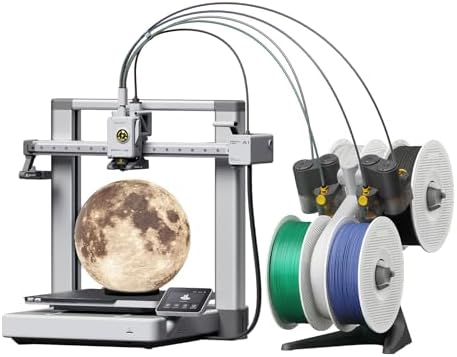
- A1 Combo + LED Lamp Kit for Functional Light Projects: Bambu Lab A1 Combo + LED Lamp Kit lets you create illuminated mod…
- High-Speed Precision: Experience unparalleled speed and precision with the Bambu Lab A1 3D Printer. With an impressive a…
- Multi-Color Printing with AMS lite: Unlock your creativity with vibrant and multi-colored 3D prints. The Bambu Lab A1 3D…
Complete Feature Comparison
| Feature | Ender-3 V3 SE | A1 Mini | Hi Combo | A1 | A1 Combo |
|---|---|---|---|---|---|
| Ease of Use | Excellent | Excellent | Very Good | Excellent | Excellent |
| Print Speed | Very Good | Excellent | Excellent | Excellent | Excellent |
| Automatic Bed Leveling | Yes | Yes | Yes | Yes | Yes |
| Multi-Color Printing | No | Optional | Yes | Optional | Yes |
| Automation | Good | Excellent | Very Good | Excellent | Outstanding |
| Print Quality | Very Good | Excellent | Excellent | Excellent | Excellent |
| Best For | Beginners | Home Users | Creative Projects | Frequent Printing | Professional Workflows |
Which 3D Printer Offers the Best Value?
The answer depends entirely on your goals.
Best for Beginners
The Creality Ender-3 V3 SE remains one of the easiest and most affordable ways to start 3D printing.
Best Compact Printer
The Bambu Lab A1 Mini offers exceptional performance while occupying minimal workspace.
Best Multi-Color Experience
The Creality Hi Combo introduces multi-color printing at an accessible level for creative users.
Best Overall Balance
The Bambu Lab A1 delivers one of the strongest combinations of speed, automation, reliability, and print quality.
Best Premium Choice
The Bambu Lab A1 Combo is the ideal option for creators and professionals seeking advanced automation and intelligent multi-color workflows.
Features That Matter Most
Many buyers focus only on print speed or build volume.
However, long-term satisfaction usually depends on several other factors, including:
- Mechanical stability
- Reliable automatic calibration
- Print consistency
- Software quality
- Community support
- Replacement part availability
- Upgrade options
- Ease of maintenance
Considering these elements before purchasing will often lead to a better overall ownership experience than comparing specifications alone.
In Part 4, we’ll cover the best filament types, recommended slicing software, essential accessories, common beginner mistakes, maintenance tips, business opportunities with 3D printing, an expanded FAQ, and the final buying recommendation.
Best Filament Types for FDM 3D Printers
Choosing the right filament is just as important as choosing the right printer. The material you use affects print quality, strength, flexibility, durability, and overall ease of printing.
Understanding the most common filament types will help you get the best results from your machine.
PLA
PLA is the most popular filament for beginners and remains one of the most widely used materials in desktop 3D printing.
Its biggest advantages include:
- Easy to print
- Excellent surface finish
- Minimal warping
- Wide variety of colors
- Low odor during printing
- Ideal for decorative objects and prototypes
PLA is the perfect starting point for new users.
PETG
PETG combines the ease of printing associated with PLA with improved strength and durability.
It’s commonly used for:
- Functional parts
- Storage organizers
- Mechanical components
- Outdoor accessories
- Household tools
Many makers consider PETG one of the most versatile filament choices available.
TPU
TPU is a flexible filament designed for parts that require elasticity.
Popular applications include:
- Phone cases
- Gaskets
- Protective bumpers
- Flexible hinges
- Wearable accessories
Although TPU requires slightly different print settings, it dramatically expands the types of products you can create.
ABS
ABS is known for its excellent mechanical strength and heat resistance.
Typical applications include:
- Automotive parts
- Engineering prototypes
- Workshop tools
- Functional mechanical components
Because ABS is more sensitive to temperature changes during printing, it generally requires additional setup compared to PLA.
ASA
ASA shares many characteristics with ABS while offering superior UV resistance.
This makes it an excellent choice for:
- Outdoor signs
- Garden accessories
- Exterior mechanical parts
- Weather-resistant projects
Recommended Slicer Software
The printer itself is only part of the equation.
A good slicer transforms your 3D model into instructions that the printer can understand.
Here are some of today’s most popular options.
OrcaSlicer
One of the fastest-growing slicing programs available today.
Its advanced optimization tools, modern interface, and excellent performance make it a favorite among experienced makers.
Bambu Studio
Specifically developed for Bambu Lab printers.
Provides seamless integration with the company’s hardware while simplifying project management and printer control.
Cura
One of the most widely used slicers in the world.
Compatible with hundreds of printers, Cura offers an excellent balance between beginner-friendly operation and advanced customization.
Creality Print
Designed specifically for Creality printers.
Includes optimized print profiles and an intuitive interface that simplifies setup for new users.
Essential Accessories
Even the best 3D printer benefits from a few basic accessories.
Some of the most useful additions include:
- Flush cutters
- Precision tweezers
- Print removal scraper
- Spare nozzles
- Nozzle cleaning needles
- Flexible magnetic build plates
- Adhesion glue sticks
- Lubricant for linear rails
- Digital calipers
- Filament storage containers
- Basic maintenance tools
These accessories improve both productivity and long-term printer maintenance.
Can You Make Money with a 3D Printer?
Absolutely.
Thousands of small businesses and independent creators generate income using desktop 3D printers.
Some of the most popular opportunities include:
Personalized Gifts
Custom keychains, desk accessories, ornaments, and keepsakes remain popular year-round.
Home Organization Products
Cable organizers, drawer dividers, storage solutions, and wall mounts continue to attract strong demand.
Gaming Accessories
Controller stands, headset holders, keyboard accessories, display mounts, and desktop organizers are popular among gamers.
Home Decor
Planters, lamps, decorative sculptures, wall art, and modern home accessories are excellent products for online marketplaces.
Replacement Parts
Many discontinued plastic components can be recreated using 3D printing, solving problems that traditional retailers cannot.
Prototype Services
Engineers, inventors, startups, and product designers frequently require rapid prototype production before manufacturing.
This represents an excellent opportunity for small businesses equipped with reliable printers.
Common Beginner Mistakes
Avoiding these mistakes will save both time and material.
Some of the most common include:
- Buying the cheapest printer without researching features.
- Using low-quality filament.
- Skipping bed cleaning.
- Ignoring nozzle maintenance.
- Storing filament in humid environments.
- Using incorrect print settings.
- Attempting complex prints too early.
- Neglecting firmware updates.
Learning proper maintenance habits early will greatly improve your printing experience.
Maintenance Tips
Routine maintenance helps ensure consistent print quality and extends the lifespan of your printer.
Good maintenance habits include:
- Keeping the build plate clean.
- Checking belt tension periodically.
- Lubricating moving components when recommended.
- Cleaning the nozzle regularly.
- Updating firmware when stable releases become available.
- Properly storing filament to prevent moisture absorption.
A well-maintained printer will consistently produce higher-quality prints while reducing unexpected downtime.
Best 3D Printer for Every Type of User
| User Type | Recommended Model |
|---|---|
| First-Time Buyer | Creality Ender-3 V3 SE |
| Best Overall Value | Bambu Lab A1 |
| Limited Workspace | Bambu Lab A1 Mini |
| Creative Multi-Color Projects | Creality Hi Combo |
| Professional Workflows | Bambu Lab A1 Combo |
Frequently Asked Questions
Which 3D printer is best for beginners?
The Creality Ender-3 V3 SE is an outstanding entry-level choice thanks to its automatic bed leveling, reliable performance, and strong community support.
Is automatic bed leveling worth having?
Absolutely.
Automatic bed leveling significantly improves first-layer consistency while reducing failed prints and minimizing manual adjustments.
Should I buy a multi-color 3D printer?
If your projects involve decorative models, personalized products, collectibles, or educational displays, multi-color printing can greatly improve both appearance and productivity.
What’s the best filament for beginners?
PLA remains the easiest material to print and is ideal for learning the fundamentals of FDM printing.
Can a desktop 3D printer become a business?
Yes.
Many entrepreneurs use desktop printers to produce custom products, prototypes, replacement parts, educational models, and personalized gifts.
Are these printers available in the United States?
Yes.
All five printers featured in this guide are widely available through major U.S. retailers, specialty 3D printing stores, and online marketplaces.
Which printer requires the least maintenance?
Modern printers with intelligent calibration systems generally require fewer manual adjustments, although every printer benefits from regular preventive maintenance.
Which printer offers the best overall value?
For most users, the Bambu Lab A1 delivers one of the strongest combinations of print quality, automation, speed, and long-term reliability.
Final Verdict
Desktop 3D printing has never been more accessible.
Whether you’re building prototypes, launching a small business, creating educational models, or simply exploring a new hobby, today’s printers offer exceptional performance at every experience level.
The Creality Ender-3 V3 SE remains one of the best choices for beginners thanks to its simplicity and outstanding value.
The Bambu Lab A1 Mini delivers premium features in a compact package that’s perfect for home users with limited workspace.
The Creality Hi Combo unlocks exciting creative possibilities through intelligent multi-color printing.
The Bambu Lab A1 stands out as one of the most balanced printers available, combining speed, reliability, automation, and exceptional print quality.
Finally, the Bambu Lab A1 Combo represents the ultimate choice for professionals, entrepreneurs, and creators who want maximum productivity with advanced multi-color capabilities.
Before making your final decision, consider the types of projects you plan to create, the amount of available workspace, and how frequently you’ll be printing.
Choosing the right printer today will provide years of creative possibilities and may even become the foundation for a successful side business.